- Home Page /
- Office Products /
- Office Electronics /
- Printers & Accessories /
- Computer Printers /
- Laser Computer Printers /
- Mono Laser Mfc 5-in-1
0 ratings





Item #:
50147138
Mono Laser Mfc 5-in-1
Item #:
50147138
HTG 109158
Price Details
Excluding Shipping & Custom charges ( Shipping and custom charges will be calculated on checkout )
*All items will import from US
0 ratings
Write a review
In stock
 Imported from USA store
QTY:
Only 10 items left in stock.
Order now and get it around Wednesday, July 01
Secured transaction
Ubuy works hard to protect your security and privacy. Our advanced payment security system ensures confidentiality by encrypting your information during transmission using AES (Advanced Encryption Standards) and SSL (Secure Socket Layer) protocols. Your payment details are 100% secure as we do not share your payment details with third party sellers.
Our Top Logistics Partners


Fast
Shipping

Free
Return*

Secure Packaging

100% Original Products

PCI DSS Compliance

ISO 27001 Certified


What Stands Out
5-in-1 Functionality
Combines printing, scanning, copying, faxing, and email capabilities, making it an all-in-one office solution that saves space and improves efficiency for busy professionals.
High-speed Printing
Delivers fast monochrome prints, significantly reducing wait times, allowing users to handle high-volume printing tasks with ease and boost productivity.
Cost Efficiency
Designed for low running costs with high-yield toner cartridges, providing excellent value for money, especially for small businesses that rely on affordable, quality printing.
Product Details
- Function: PC Fax, Wired/Wireless Networking, Duplex Double sided (Mono Print/Scan/Copy/Fax).
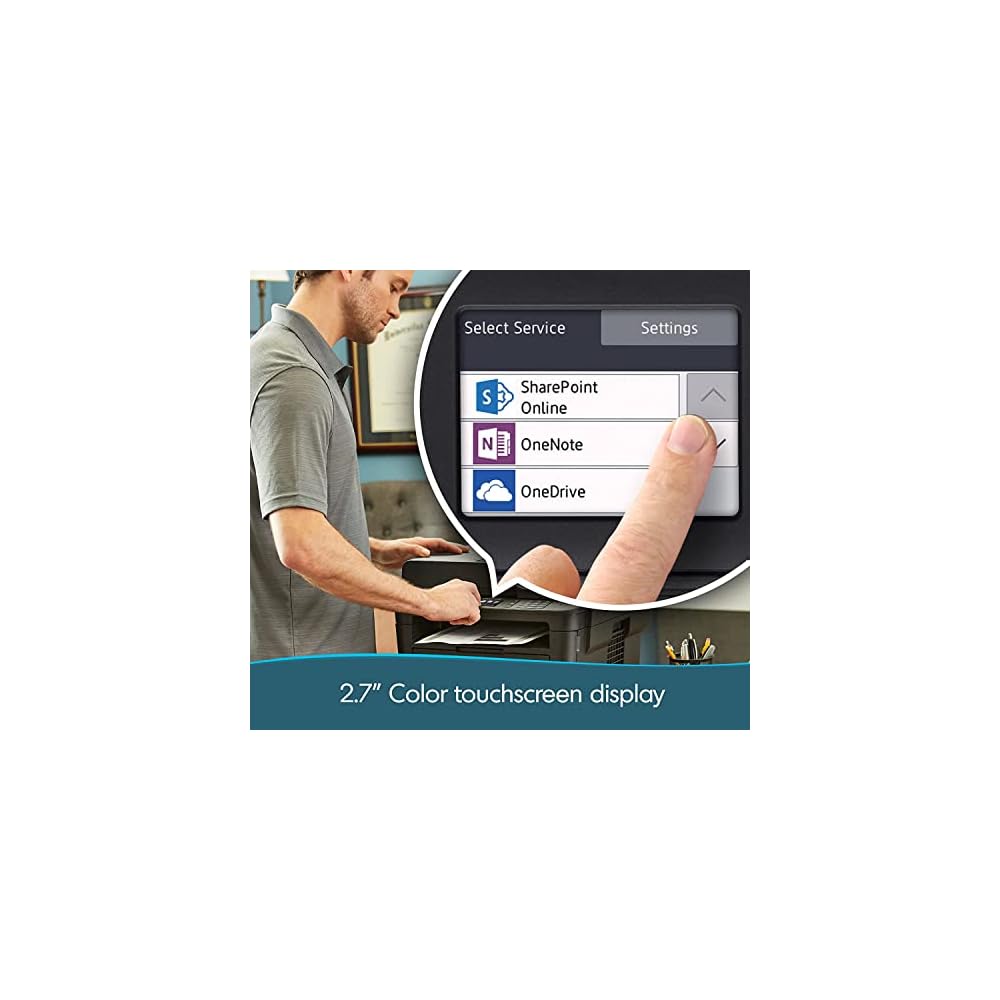
- Fast print speeds up to 36ppm in black with a monthly duty cycle of 15000 pages; Easily manage tasks with intuitive 2.7" TFT color touchscreen.
- Laser printing with a resolution of up to 2400 x 600 dpi ensures detailed, high-quality prints; 250-sheet input capacity and a single-sheet bypass tray. Types of media supported include envelopes, plain paper, labels; 256MB printer memory and 500-page fax memory ensure speed and accuracy; Automatic duplexing for effortless two-sided copying, scanning, and printing with 50-sheet auto feeder.
- USB Hi-Speed 2.0, Ethernet, Wireless, Wi-Fi Direct, NFC connectivity enhance productivity. Connect and print your way. Brother iPrint&Scan, Air Print, Web Connect, Brother's Apps, Mopria. Works with Alexa Print for voice activated printing or choose from versatile connection options with built-in wireless or connect locally to a single computer via its USB interface.
- In the Box: Brother MFC-L2750, cartridge, DR730 drum, quick setup guide and basic user's guide, installation CD-ROM, AC power cord, telephone line cord
| Printer Type | Laser |
| Other Special Features of the Product | Auto-Duplex |
| Printer Output Type | Monochrome |
| Item Weight | 33 Pounds (14.97 kg) |
| Item Dimensions D x W x H | 23"D x 20.5"W x 17.5"H (58.4 x 52.1 x 44.5 cm) |
| Controller Type | Amazon Alexa |
| Print media | Paper (plain) |
| Scanner Type | Flatbed, Sheetfed |
| Maximum Copy Speed Black and White | 36 ppm |
| Compatible Devices | PC |
| Maximum Copies Per Run | 50 |
| Ink Color | Black |
| Additional Printer Functions | All In One |
| Control Method | Voice |
| Compatible Cartridge | Arthur Imaging compatible Brother MFC-L2750DW Toner Cartridges |
| Number of Trays | 2 |
| Processor Count | 1 |
| Resolution | 2400 x 600 |
| Display Type | LCD or LED |
| Color | Black |
| Printer Connectivity Type | USB |
| Hardware Interface | Ethernet, USB |
| Number of Ethernet Ports | 1 |
| Total Usb Ports | 1 |
| Brand | Brother |
| Model Name | MFC-L2750DW |
| Model Number | MFC-L2750DW |
| Built-In Media | Brother MFC-L2750, cartridge, DR730 drum, quick setup guide and basic user's guide, installation CD-ROM, AC power cord, telephone line cord |
| Series Number | 2750 |
| Model Series | MFC-L |
| Specific Uses For Product | Office |
| UPC | 798044323789 |
| Manufacturer | Brother |
| Item Type Name | Laser Printer |
| B&W Pages per Minute | 36 ppm |
| Maximum Media Size | Legal |
| Maximum Sheet Capacity | 50 |
| Output sheet capacity | 50 |
| Maximum print Resolution Color | 2400 x 600 |
| Maximum Print Resolution Black and White | 2400 x 600 dpi |
| Dual-sided printing | Yes |
| Duplex | Automatic |
| Maximum Copy Resolution Black and White | 2400 dpi |
| Connectivity Technology | USB |
| Printing Technology | Laser |
| Special Feature | Auto-Duplex |
| Printer Output | Monochrome |
| Max Printspeed Monochrome | 36 ppm |
| Product Dimensions (L x W x H) | 23"D x 20.5"W x 17.5"H (58.4 x 52.1 x 44.5 cm) |
Who Should Buy?

-
Small Businesses
Ideal for small businesses needing an all-in-one printer for printing, scanning, copying, and faxing documents efficiently.
-
Students
Perfect for students requiring reliable printing and scanning at home for assignments and projects without high costs.
-
Home Offices
Great for home office setups that need multifunctionality without consuming too much space and maintaining print quality.

-
High Volume Users
Not suitable for users who require a high volume of color printing, as it's a mono printer.
-
Professional Photographers
Not ideal for professional photographers needing high-quality color prints, as the functionality is limited to monochrome printing.
-
Casual Home Users
Not recommended for casual users needing occasional printing, as it may be overkill for minimal tasks.
Product Description
Have any Query? Chat with us
Customer Questions & Answers
-
Question:
What functions does the Mono Laser Mfc 5-in-1 offer?
Answer: The Mono Laser Mfc 5-in-1 combines printing, scanning, copying, faxing, and even an automatic document feeder in one efficient device. This multifunction capability helps streamline operations, particularly in small or home office settings where space and performance are crucial. For instance, you can print documents, scan receipts, copy multipage brochures, and even fax important contracts all from one machine, making it a versatile solution for a variety of tasks. -
Question:
What is the print speed of the Mono Laser Mfc 5-in-1?
Answer: The Mono Laser Mfc 5-in-1 offers an impressive print speed, typically around 30 pages per minute. This efficiency caters to users who need quick turnaround times for document printing. Whether you're generating reports or printing handouts for a meeting, the fast print speed ensures that you won't be waiting long, allowing you to focus more on your tasks rather than on print times. -
Question:
How does the Mono Laser Mfc 5-in-1 handle connectivity?
Answer: The Mono Laser Mfc 5-in-1 provides a range of connectivity options, including USB, Wi-Fi, and Ethernet. This flexibility allows for easy integration into various network setups, whether at home or in an office. Users can print wirelessly from smartphones, tablets, or laptops without being tied down by physical connections, making it convenient for modern working styles. -
Question:
Can I print in color with the Mono Laser Mfc 5-in-1?
Answer: The Mono Laser Mfc 5-in-1 is specifically designed for black and white printing, making it ideal for high-volume text documents. If your work primarily involves monochrome prints, this device excels with crisp, clear outputs. For full-color needs, a different model may be more appropriate, but for administrative tasks, reports, and other monochrome applications, this device is perfect. -
Question:
What type of toner does the Mono Laser Mfc 5-in-1 use?
Answer: The Mono Laser Mfc 5-in-1 uses a standard toner cartridge specifically designed for consistent performance and quality. The cartridge typically yields a high number of prints, which is beneficial for users requiring longevity and fewer interruptions for toner replacements. This ensures that you can complete large print jobs without a hitch, making it ideal for busy work environments. -
Question:
Is the Mono Laser Mfc 5-in-1 compatible with various operating systems?
Answer: Yes, the Mono Laser Mfc 5-in-1 is compatible with multiple operating systems, including Windows, macOS, and various Linux distributions. This broad compatibility allows users to easily set up and integrate the device into their existing technology ecosystem. Regardless of the system you prefer, you can expect straightforward installation and operation, making it an excellent fit for diverse settings. -
Question:
What are the scanning features of the Mono Laser Mfc 5-in-1?
Answer: The Mono Laser Mfc 5-in-1 features advanced scanning capabilities, including options for multiple file formats and resolutions. It allows for both single-page and multipage scanning, which can be essential for digitizing documents or sending information electronically. Users can scan images for preservation or convert paper documents into PDFs, enhancing office efficiency and document management. -
Question:
How is the build quality of the Mono Laser Mfc 5-in-1?
Answer: The Mono Laser Mfc 5-in-1 is constructed with high-quality materials that ensure durability and longevity, suitable for various environments from home offices to bustling workplaces. Its robust design offers reliability during intensive use, so users can trust it for their daily printing needs. Overall, the solid build translates into a dependable performance, reflecting positively on your business image. -
Question:
What is the footprint of the Mono Laser Mfc 5-in-1?
Answer: The Mono Laser Mfc 5-in-1 has a compact footprint, making it an ideal choice for spaces with limited room. It can easily fit on a desk or side table without overwhelming your workspace. This small size does not come at the expense of functionality; you still have access to all the features that a larger model would offer, catering well to small businesses or home users. -
Question:
Where can I buy the Mono Laser Mfc 5-in-1 in Haiti?
Answer: You can purchase the Mono Laser Mfc 5-in-1 from Ubuy, which offers a reliable platform for acquiring electronics. With Ubuy, you can expect a seamless shopping experience, including product availability and specifications at your fingertips. This makes it convenient to choose and buy the device with confidence, no matter your specific requirements.
Brother Laser Printers MFC-L2750DW Editorial Review
No editorial reviews found
Customer Reviews & Ratings
8 customers ratings
-
5 Star
66%
-
4 Star
0%
-
3 Star
17%
-
2 Star
0%
-
1 Star
17%
Review this product
Share your thoughts with other customers
Pros
- Fast printing speed
- Compact design
- Wireless connectivity
- User-friendly touchscreen
- High-quality prints
Cons
- Slightly loud during operation
Product Price History
Important information
- Limitations : For products shipped internationally, please note that any manufacturer warranty may not be valid; manufacturer service options may not be available; product manuals, instructions, and safety warnings may not be in destination country languages; the products (and accompanying materials) may not be designed in accordance with destination country standards, specifications, and labeling requirements; and the products may not conform to destination country voltage and other electrical standards (requiring use of an adapter or converter if appropriate). The recipient is responsible for assuring that the product can be lawfully imported to the destination country. When ordering from Ubuy or its affiliates, the recipient is the importer of record and must comply with all laws and regulations of the destination country.
- Not all the products listed on Ubuy are for sale, as Ubuy is a global search engine. Products are subject to export/trade regulations.
HTG 109158
Order now and get it around Wednesday, July 01
This item is not restrict in my country.(Please click on above link if this item is not restrict in your country, So our team will review and allow.)
QTY:
Only 10 items left in stock.
Secured transaction
Ubuy works hard to protect your security and privacy. Our advanced payment security system ensures confidentiality by encrypting your information during transmission using AES (Advanced Encryption Standards) and SSL (Secure Socket Layer) protocols. Your payment details are 100% secure as we do not share your payment details with third party sellers.
Our Top Logistics Partners
Fastest cross-border delivery